Friday, October 31, 2025

Halloween Clip Art - Collage

  Choose 3- 5 images to combine onto one canvas

Step 1- Open NEW CANVAS

Step 2- Choose clipart/images and open in Photoshop

Step 3- Selection tools, Move tool and transform tools

Step 4- Consider Text

Step 5 - save as a jpeg and post to your website the final collage and images used

LAST STEP- Create a 2-3 slide GIF . In class demonstration. Examples attached


Wednesday, October 29, 2025

Extra Credit - Choose one


Choose a tutorial-
Zombie, Haunted House or Vampire: Use a  portrait image  (one of your own or from the internet) . Follow one of the following tutorials. Convert to a  jpg.


Vampire


Create a  Haunted House in Photoshop


ZOMBIE


Sunday, October 26, 2025

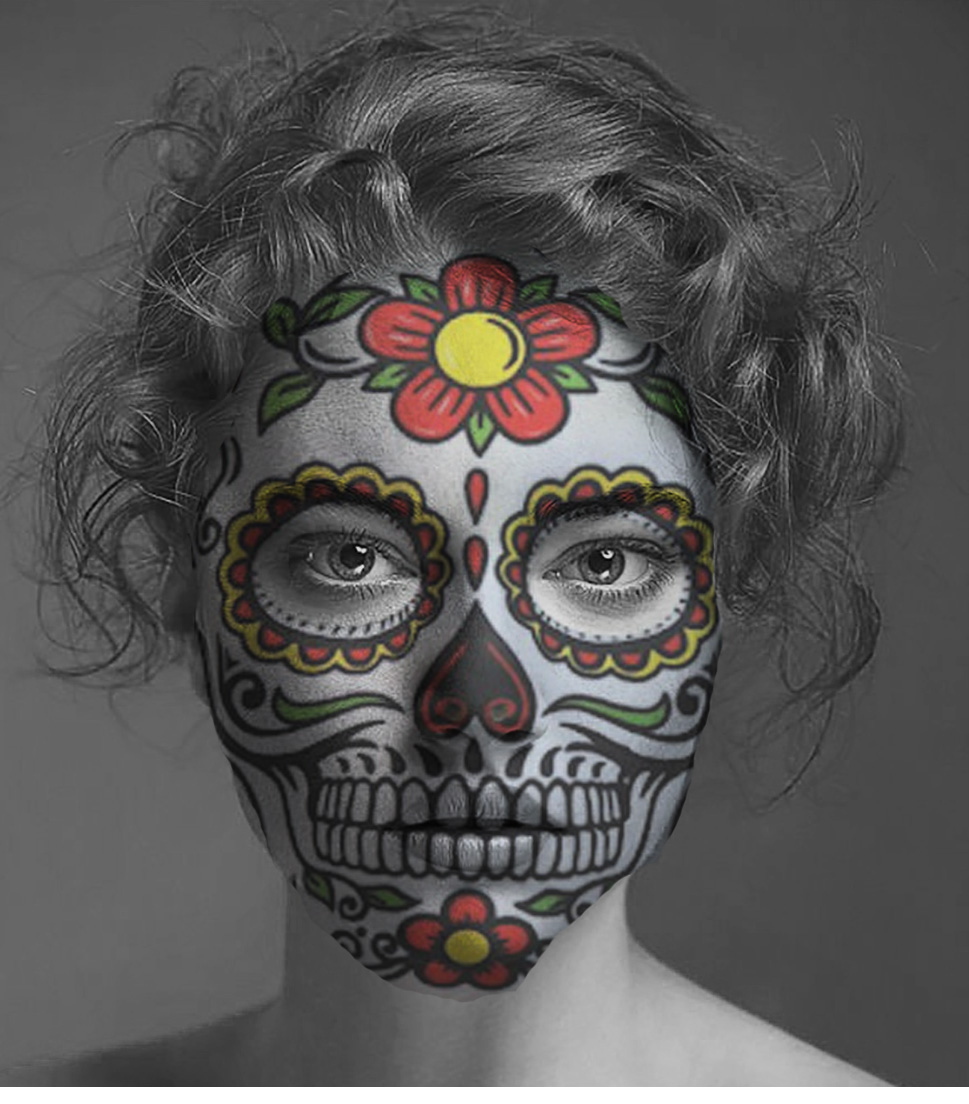
Halloween Face Masks


Complete 3 mask projects. 
1. Sugar skull
2. Cracked earth
3. Skull


Process

 1. Your photo

2. Mask

Post the before and after images to your website

Tools- 

Marquee , select. Move. Transform. erase. Transform Warp

Puppet Warp

Blending mode- Darken or your choice


Photoshop Halloween Face Mask Projects Rubric 

Criteria

3 - Exceeds Expectations

2 - Meets Expectations

1 - Needs Improvement

Completion of Projects

All 3 mask projects (Sugar Skull, Cracked Earth, Skull) are fully completed with clear before and after images posted to the blog.

2 of the mask projects are completed with before and after images posted.

Only 1 or none of the mask projects are completed or images are missing from the blog.

Use of Photoshop Tools

Skillful and creative use of Marquee, Select, Move, Transform, Erase, Transform Warp, Puppet Warp, and Blending Modes (Darken or choice) to enhance mask effects.

Adequate use of most tools listed to create the masks with noticeable effects.

Minimal or incorrect use of Photoshop tools with limited or no effect on the masks.

Photo and Mask Integration

Photos and masks are seamlessly integrated showing strong understanding of layering and blending techniques.

Photos and masks are integrated with some noticeable blending or layering issues.

Integration of photos and masks is poor or incomplete, lacking effective blending or layering.

Creativity and Originality

Masks demonstrate high creativity and originality in design and execution beyond basic requirements.

Masks show some creativity and originality with basic design elements applied.

Masks lack creativity or originality and appear copied or minimally modified.

Presentation on website

Before and after images are clearly labeled, well-organized, and visually appealing on the website.

Images are posted on the website but with minimal labeling or organization.

Images are missing, poorly labeled, or not posted on the website.


Long Exposure- Studio image


Lucas Anderson and Dylan Vigil


Colin Kubo and Mathew Carano


Long exposure. Label metadata.
Top 3 studio images

Double Exposure- Long exposure


Double exposure


long exposure


Instructions:

1. Open image

2.  layer- Duplicate layer

3.  new adjustment layer- Convert to black and white

4.  layer- Merge layer

5.  layer- Duplicate layer (3 layers now)

Lastly uncheck R on RGB and use the move tool to adjust image


Post before and after images to your website

Tuesday, October 21, 2025

The Collodion - Photographic Processes Series - Chapter 5 of 12


Bonus - 5 points

Photography and Its Historical Impact

1. Describe the significance of the wet collodion process in the evolution of photography.

2. Explain how the introduction of tintypes changed the accessibility of photography during the American Civil War.


Monday, October 20, 2025

Egg Photoshop- project


Use your Studio  Egg Photo to complete your Photoshop Magazine Cover:  
The Incredible Edible Egg

1.  Open a new photoshop document.Canvas size 8.5" wide by 10.5"  high @ 300 ppi
Paint bucket/ gradient tool. Background color.

 2.File /place your egg image into this file(save).

 3.Text tool , choose an appropriate font and color to type in your masthead title.The Incredible Edible Egg
Make it bold enough to be a focal point.Use Text effects

 Keeping the layer highlighted, switch to the move tool, use the transform tool(command T)
to stretch your text to fill the top portion of the cover.

 Select the type tool.Use a contrasting color and a smaller font. Use the move tool to position it.

 Using the Text tool, type your feature headline.  Use a bold face and color to make it stand out( Remember text effects ex: drop shadow, outerglow ,inner glow etc).This should grab the attention of the reader . 

Ideas include transform, warp, rotate, skew and  text effects.


 Consider your spacing or leave a margin around the entire cover at least 1/4",  Use color ,  Edit your image , use effects and blending modes effectively .


Rubric for Photoshop Magazine Cover: The Incredible Edible Egg

CriteriaExceeds Expectations (3)Meets Expectations (2)Needs Improvement (1)
Canvas Size and ResolutionCanvas is 8.5" wide by 10.5" high at 300 ppiCanvas size is close to the specified dimensions and resolutionCanvas size and/or resolution do not meet the requirements
BackgroundCompelling gradient or solid color background that enhances the designBackground color is appropriate but could be more engagingBackground is plain or distracting
Egg PlacementEgg image is strategically placed and integrated seamlessly into the designEgg image is placed appropriately but could be better integratedEgg image placement is awkward or distracting
Masthead TitleMasthead title uses an appropriate, bold font that is the focal point of the coverMasthead title is readable but could be more visually strikingMasthead title is difficult to read or does not stand out
Headline TextHeadline text is eye-catching, uses effective text effects, and is well-positionedHeadline text is legible but could be more visually compellingHeadline text is hard to read or poorly positioned
Overall CompositionAll elements are well-balanced, with appropriate use of white space and effective use of color and effectsMost elements are well-placed, but the overall composition could be more polishedThe composition is cluttered or lacks visual harmony
Technical ExecutionAll tools and techniques (transform, warp, rotate, etc.) are used skillfully and effectivelyMost tools and techniques are used appropriately, but there are minor technical issuesThere are significant technical issues or the use of tools is ineffective


Weekly Vocabulary

     Find the definition and an image for each term.


1. Cyanotype

2. Wet plate/ dry plate photography

3.Collodian process

4. GIF file

5. Calotype photography


Bonus - 5 points

Photography and Its Historical Impact

1. Describe the significance of the wet collodion process in the evolution of photography.

2. Explain how the introduction of tintypes changed the accessibility of photography during the American Civil War.


Sudhir Shivaram - Artist of the Week


https://www.sudhirshivaram.com/portfolios 


View Sudhir's's photography.
Choose top 2 images . Post to your blog.Answer the following questions

1. How is the technical quality? 
2. How’s the composition? 
3. Does the photographer tell a story
4. What do you find interesting about his work? 


High Key and Low Key