Monday, September 29, 2025

METADATA


Metadata, or Exchangeable Image File Format (EXIF), contains information about a photo, such as the date, time, file name, color space, aperture value, and camera model. Inconsistencies in the metadata can indicate deceptive editing or manipulation. 
  • Right-click
    Right-click on the image and select Properties or Info. On Windows, the Details tab will display the metadata. 
How do I remove EXIF data?

Although EXIF data is very useful, there may be times when you'd prefer not to share details that identify you, your location or your camera equipment.

If you host and post images online, some services may automatically strip out embedded metadata for privacy reasons. The image.canon cloud-based photo management service offers the option to generate a "thumbnail" version of an image (a JPEG up to 2,048 pixels), suitable for web or app use, and this thumbnail will not include the image metadata.

EXIF data can also be unintentionally removed from a digital photo when you're carrying out post-processing and manipulation, such as compositing images. But how can you remove EXIF data intentionally, or delete specific information you don't want to share?

There are a several standalone EXIF removal tools available, but there are more straightforward options. If you're using Windows, you can do the job directly in File Explorer:

  1. Right-click the image and select Properties, then click the Details tab.
  2. Click Remove Properties and Personal Information at the foot of this window.
  3. You'll be given the option to create a copy of the image with all the metadata removed, or remove some or all of the EXIF data from the existing file.
It's also easy to remove EXIF data in your image editing and RAW processing software, including DPP and Lightroom. Here's how to do it in DPP:
  1. Go to File > Convert and save.
  2. In the window that appears, click and hold the drop-down menu next to Shooting info setting.
  3. You can choose to remove the shooting info or just the GPS info – or leave all the shooting info intact.
You also have the option of including or excluding GPS info when you transfer files wirelessly from a Wi-Fi enabled Canon camera to a mobile device via the Canon Camera Connect app. Removing GPS data from a photo can be a priority for people who want to protect their privacy, particularly if it discloses the location of their home.

Fat Bear Week 2025


 https://katmaiconservancy.org/fatbearweek


MEET THE BEARS


Hall of Fame Champions


https://explore.org/fat-bear-week-schedule


Bear Cam


Weekly Challennge - Fall Leaves

Photography challenge ideas focused on fall leaves. You can explore different techniques, from close-ups and motion shots to incorporating human subjects and finding unique settings. 

Weekly Photography Challenge – Fall

  • A single perfect leaf: Find a fallen leaf with a striking color, texture, or pattern and capture it in isolation.
  • The glowing leaf: Backlight a thin leaf with the sun to make its colors and veins pop.
  • Wet leaf textures: After a rain shower, photograph how water droplets and moisture intensify the colors and add visual interest to leaves on the ground or still on a tree.Challenge 2: Creative compositions
    Try different perspectives and arrangements to create unique and artful images.
    • Reflections in water: Find a puddle, stream, or pond and capture the reflection of colorful trees or leaves floating on the surface.
    • The fall "carpet": Photograph the blanket of fallen leaves on the ground, emphasizing the rich patterns and colors.
    • Leading lines: Use a path, trail, or row of trees to create leading lines that guide the viewer's eye through the autumn scene.
    • Framed by fall: Frame a shot using a cluster of leaves or branches in the foreground to draw attention to your subject
    • Challenge 3: Movement and motion
      Leaves aren't static subjects. Use shutter speed and composition to capture their energy and movement.
      • Falling leaves: Have a model (or use a helper) throw a handful of leaves in the air. Use a fast shutter speed or burst mode to freeze the action.
      • Autumn road blur: Find a country road lined with trees. Use a slow shutter speed to capture the motion of a passing car or a person walking to create a sense of movement among the static leaves.
      • Windy day motion blur: On a breezy day, use a slightly slower shutter speed to blur the movement of leaves on a branch

Photography Lighting Lesson - Remember the EGG


Studio Study of Light and Shadow. Egg Challenge. Top 5 Egg Photos


Studio Study of Light and Shadow.

 Egg Challenge. Top 5 Egg Photos.

Using the DSLR photograph the egg in a manual setting. Demonstrate the ability to adjust aperture ISO and shutter speed.

Collect the METADATA for each image.Label the metadata for each image.


Criteria

Exceeds (3)

Meets (2)

Developing (1)

Manual Camera Settings

Consistently demonstrates precise control of aperture, ISO, and shutter speed to create desired lighting and shadow effects. Metadata is accurately labeled for all 5 images.

Generally controls aperture, ISO, and shutter speed to create appropriate lighting and shadow effects. Metadata is labeled for most images.

Struggles to control aperture, ISO, and shutter speed, resulting in inconsistent lighting and shadow effects. Metadata is missing or inaccurate for most images.

Composition & Creativity

Compositions are visually striking, with creative use of lighting, shadow, and camera angle to enhance the egg's form and texture. All 5 images show a unique perspective.

Compositions are thoughtful, with effective use of lighting, shadow, and camera angle. Most of the 5 images show different perspectives.

Compositions lack creativity or visual interest. Few of the 5 images demonstrate different perspectives.

Technical Quality

All 5 images are in sharp focus, with no visible noise or aberrations. Lighting is balanced and highlights the egg's details beautifully.

Most images are in focus with minimal noise or aberrations. Lighting is generally well-controlled, but may have some minor inconsistencies.

Multiple images are out of focus, with visible noise or other technical issues. Lighting is inconsistent or detracts from the egg's details.

Egg Challenge: Top 5 Egg Photos Rubric


Guide to Exposure- Aperture


ack and White with focal point

   Black and White with focal point

3 edited photos. Post the before and after images

Using photoshop . Tools

Layer adjustment- Black and White. Eraser.

Export as jpeg


Black and White with Focal Point Rubric

Criteria

Exceeds (3 points)

Meets (2 points)

Does Not Meet (1 point)

Focal Point

The focal point is clearly defined and draws the viewer's attention immediately. The subject is sharp and in focus, while the background is blurred or darkened to emphasize the main subject.

The focal point is present, but it could be more defined or prominent. The subject is in focus, but the background is not as effectively blurred or darkened.

The focal point is unclear or not well-defined. The subject is not the primary focus, and the background is not effectively manipulated to draw attention to the main subject.

Black and White Conversion

The image has been converted to a high-quality black and white version, with a wide range of tones and contrast that enhances the overall composition. The use of black and white effectively conveys the desired mood or emotion.

The black and white conversion is adequate, but the tones and contrast could be improved to better enhance the composition. The use of black and white somewhat conveys the desired mood or emotion.

The black and white conversion is poor, with limited tonal range and contrast. The use of black and white does not effectively convey the desired mood or emotion.

Overall Composition

The overall composition is visually striking and well-balanced. The placement of the subject, use of negative space, and attention to the rule of thirds create a cohesive and engaging image.

The overall composition is generally well-structured, but there are minor areas that could be improved to enhance the visual impact.

The overall composition is weak, with poor placement of the subject, ineffective use of negative space, and a lack of attention to the rule of thirds, resulting in a disjointed and unengaging image.


Weekly Vocabulary

   Post the definition and an image for each term.

1. Vignette

2. Bokeh

3. Aperture Priority

4. Ambient Light

5.Blue Hour


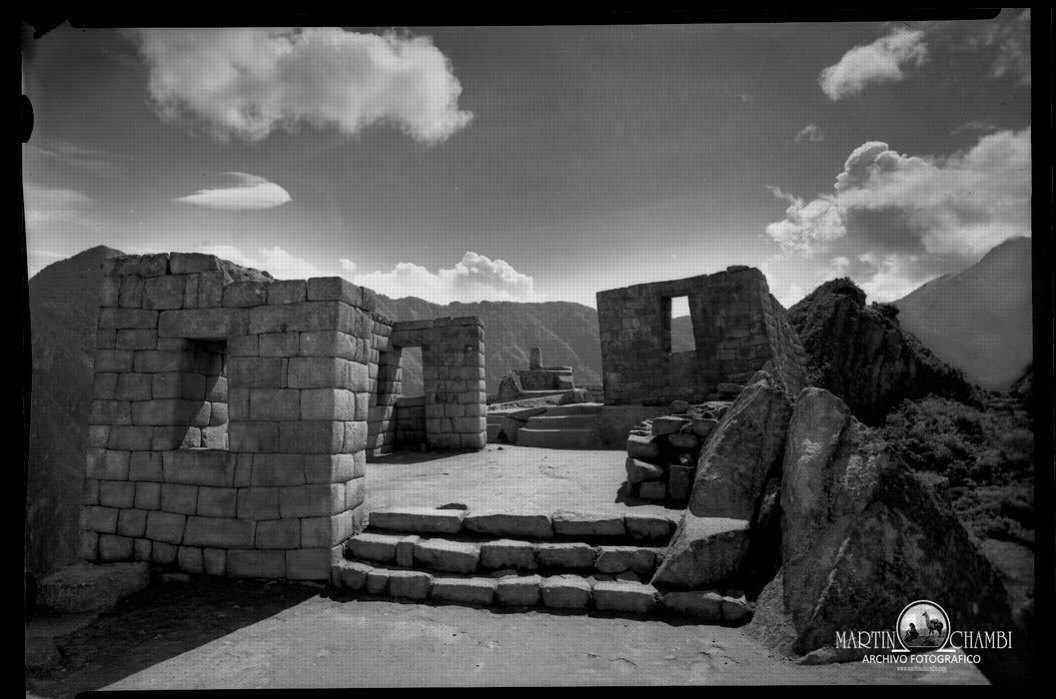
tist of the Week- Martin Chambi

     http://martinchambi.org/en/


                                                                    Martin Chambi at Macchu Picchu, 


His daughter, Julia Chambi, is quoted as saying, "my father was enchanted by light."[4] His studio in Cuzco included a set of blinds and shutters made specifically so that he could alter the natural lighting to best suit his photographs


A reed-built boat on Lake Titicaca, in the shape of a tiger. [Martin Chambi]


                                                            Self Portrait Machu Picchu 


                                                             A costume party. [Martin Chambi]


"It is wrong to focus too much on the testimonial value of his photos. They have that, indeed, but, in equal measure they express the milieu in which he lived and they show (...) that when he got behind a camera, he became a giant, a true inventor, a veritable force of invention, a recreator of life."

Mario Vargas Llosa

                                                 The family of Ezequiel Arce with their potato crop. [Martin Chambi]


                                                        Martín Chambi – Self Portrait in Studio, Cusco 1921

Choose top 2 images  .

Answer the following questions

  1. How is the technical quality? 


2. How’s the composition? 


       3. What do you find interesting about his work? 


High Key and Low Key